> For the complete documentation index, see [llms.txt](https://www.trentbauer.com/llms.txt). Markdown versions of documentation pages are available by appending `.md` to page URLs; this page is available as [Markdown](https://www.trentbauer.com/guides/installation-guides/crowdsec.md).
# Crowdsec
[CrowdSec](https://www.google.com.au/search?q=CrowdSec\&safe=active\&ssui=on\&ved=2ahUKEwirpr2p7aCSAxXAcWwGHVrCIgUQgK4QegQIARAB) is an open-source, community-driven Intrusion Prevention System (IPS) that analyzes server logs to detect and block malicious IP addresses in real time. It acts like a modern, collaborative [Fail2Ban](https://www.google.com.au/url?sa=i\&source=web\&rct=j\&url=https://wz-it.com/en/blog/explained-and-set-up-crowdsec/\&ved=2ahUKEwirpr2p7aCSAxXAcWwGHVrCIgUQy_kOegQIARAD\&opi=89978449\&cd\&psig=AOvVaw0A0EcHScJxDp_VfPoMJywX\&ust=1769229955543000), sharing threat intelligence among users to create a collective, constantly updated, and curated blocklist.
Stolen from Crowdsec's website
Crowdsec Engine
The crowdsec engine is the processor and central logging unit that watches your log files and what is occuring on your server. It tells the bouncer what to do The engine also reports your data back to the Crowdsec UI to manage there if you enable this
Crowdsec Bouncer
The bouncer takes action, eg blocking an IP, and requires a connection to the engine to function.
## Before following these guides
All of my Crowdsec guides expect the following:
* [ ] Docker installed
* [ ] Ubuntu or similar OS
* [ ] An existing Crowdsec account
* [ ] You have an enrollment key ready to go [#generate-your-enrollmemt-key](#generate-your-enrollmemt-key "mention") and
* [ ] **You have read this page in its entirety**
## Generate your Enrollmemt key
All of my compose stacks have variables set to enrol your engine into Crowdsec.
1. Navigate to
2. Click on 'Enroll' and copy the enrolment key to clipboard
This key can be saved to your password vault as it rarely changes
## Compose stacks
All of my Crowdsec stacks will include an 'init' (initialization) container, which is used to download the configuration files required. **The configuration file URLs are readable in the compose file and** [**publicly available on my Github**](https://github.com/trentnbauer/HomelabPublic/tree/main/crowdsec)**.** These are my production configs and may change over time. As such, I would recommend hosting your own.
Restarting the stack may re-run the init container. If you have made changes to the config file, these may be overwritten.
#### Here is an example 'init' container,
{% hint style="info" %}
I have highlighted the line downloading the configuration file. You can browse to the address to view the contents.
{% endhint %}
***
## Using Crowdsec
### Where should I deploy my Crowdsec Engine/s
Prioritize protecting anything that is
* A bridge between your local network and the internet (e.g. your firewall)
* Port forwarded
* High impact if brought offline
{% hint style="info" %}
While I recommend protecting as much as you can, each engine increases your risk of being rate limited. Because of this, I would recommend protecting your public facing services first.
\
Applications behind a Cloudflare tunnel are not included in this as the entry point is the Cloudflare network. Refer to [Cloudflare security rules](/guides/installation-guides/crowdsec/cloudflare-security-rules.md) for protecting your tunnels.
{% endhint %}
### Add Blocklists
Crowdsource lists are public lists of malicious IP addresses. You can subscribe to a list to automatigically add those to the Cloudflare [Cloudflare](/guides/installation-guides/pelican/cloudflare.md#security-rules) generated by Crowdsec
{% hint style="info" %}
Free tier Crowdsec has a limit on how many blocklists you can subscribe to
{% endhint %}
1. Navigate to and review the lists. **Most are paid**
2. Open a list that sounds good
3. Click on subscribe
4. Select either organization, or engine (and select your Pelican engine)
5. For remediation, select Captcha
6. Click on OK / Save / Subscribe
### I personally use the below lists
{% embed url="" %}
{% embed url="" %}
{% embed url="" %}
### Decisions
Once enrolled, you will be able to see your engines decisions (blocked IPs) at alongside some other useful information.
{% hint style="info" %}
If this is a fresh install of Crowdsec, you likely won't have any 'decisions' listed
{% endhint %}
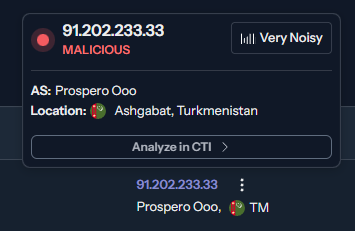
Here is an example from my instance;
This malicious IP from Turkmenistan is "very noisey", which means it shows up in a lot of other peoples Crowdsec instances.
#### **Unblock an IP**
If you need to delete a false positive or unblock an IP,
1. Navigate to
2. Click on the bin icon next to the IP address
3. Wait a few minutes for things to sync
or
1. Exec into the relevant engine
2. Run the command `cscli decisions delete --ip IPADDRESS`
3. Wait a minute or 2 for Crowdsec to talk to the bouncer, to talk to the service
***
#### Crowdsec is best deployed using a central engine, [per this documentation.](https://docs.crowdsec.net/u/user_guides/multiserver_setup/)
**My guides aren't written this way.** I'm using multiple engines to make it easier to spin up and down stacks. There are some benefits / negatives;
* **Easier to deploy**\
My stacks are written to be spin-up-and-go. You will only need to accept the enroll request in the Crowdsec UI
* **Risk of being rate limited**\
Due to having multiple engines, you run the risk of being rate limited by Crowdsec. Each engine increases your API calls.
* **Syncing across engines**\
Using a central engine will instantly block a malicious IP across all your bouncers. This may not occur using multiple engines.
*If you want to use a single engine, you're best to look at other guides.*