> For the complete documentation index, see [llms.txt](https://www.trentbauer.com/llms.txt). Markdown versions of documentation pages are available by appending `.md` to page URLs; this page is available as [Markdown](https://www.trentbauer.com/guides/other-guides/gearbox-shift-codes.md).
# Gearbox Shift codes
| |
|---|
| Total Time Required | 15 minutes |
| Difficulty | Easy |
| Required Knowledge | N/A |
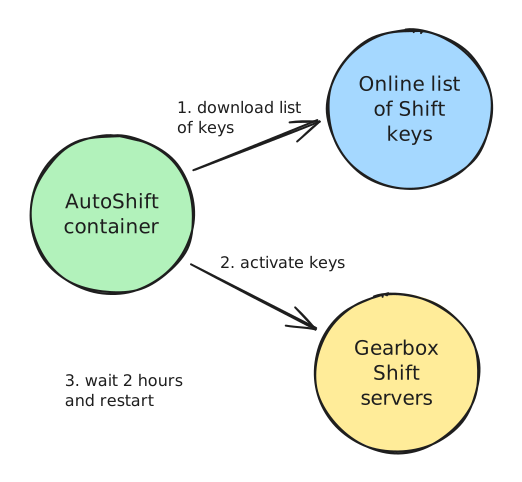
This Compose stack will automate activating all SHiFT keys publicized online and any future ones if you leave it running 24/7
It is configured to activate keys for every game, on every platform - *including ones you do not own yet.*
 ## Prerequisites
* [ ] A Gearbox account
* [ ] Own a SHiFT enabled game
* [ ] A machine to run the compose file on
{% hint style="info" %}
I am writing this documentation for Windows, under the assumption that most people referencing this guide won't have a homelab
If you do have a homelab, feel free to skip to the docker compose section to get the compose file and env
{% endhint %}
## Install Docker
First, you will need to install the Docker engine on your machine.
1. Install Docker Desktop from [the MS Store](https://apps.microsoft.com/detail/XP8CBJ40XLBWKX?hl=en-AU\&gl=AU\&ocid=pdpshare)
2. Launch Docker Desktop and make sure it opens
If you get an error about virtualization, you will need to enable this in your BIOS.
## Docker Compose
Next you will need to create a folder to store the Compose files
1. Select a location on your machine and create a new folder named "Shift Codes" and open that folder
2. Create a `docker-compose.yml` file with the below contents
{% @github-files/github-code-block url="" %}
3. Create a `.env` file with the below contents
```dotenv
SHIFT_USER=
SHIFT_PASS=
TZ=UTC
```
4. Edit the `.env` file and include your shift credentials
5. Right click anywhere in the folder and select open in terminal, command prompt or powershell (whatever is listed for you)
6. Type the command `docker-compose up` and hit enter. You will see a bunch of stuff similar to
```bash
[+] Running 11/11
✔ codes Pulled 7.8s
✔ 1b64e0a03908 Pull complete 0.4s
✔ 259ed463204a Pull complete 1.0s
✔ 362fe14d6ada Pull complete 0.8s
✔ be05809686d4 Pull complete 3.2s
✔ 2d35ebdb57d9 Pull complete 1.5s
✔ 22ba1c2e1d45 Pull complete 1.7s
✔ f359a033f6ef Pull complete 4.4s
✔ f99639dbba01 Pull complete 2.9s
✔ 4f4fb700ef54 Pull complete 0.0s
✔ ccee2fc01e4b Download complete 0.0s
[+] Running 3/3
✔ Network shiftcodes_default Created 0.0s
✔ Volume shiftcodes_autoshift Created 0.0s
✔ Container shiftcodes-codes-1 Created 0.3s
```
7. If you see *"trying to redeem..."* in the logs per below, this means the container is authenticated and functioning
```bash
INFO Trying to redeem 5 Golden Keys auto.py:68
(ZRW3J-HRRX6-K3RCB-TB3BB-5BFJB)
INFO Redeemed 5 Golden Keys auto.py:75
```
8. Hit CTRL+C to exit and run `docker-compose up -d`
{% hint style="info" %}
This command 'detaches' the container from your terminal window and runs it in the background
{% endhint %}
## Common errors
#### Couldn't login. Are your credentials correct?
Make sure your env file is named correctly - `.env` (DOTenv) - and has your credentials
#### Please launch a SHiFT-enabled title first!
You are either rate limited (the container will try again in 2 hours) or need to launch a game with Shift codes. This is how Gearbox limits people claiming too many codes.
## FAQ
**Multiple Accounts?**
Yes - follow the guide again, but place the compose and .env file in a different folder.
**Where do the shift codes come from?**
Locate the `SHIFT_SHIFT_SOURCE` line in the compose file for the source address
## Prerequisites
* [ ] A Gearbox account
* [ ] Own a SHiFT enabled game
* [ ] A machine to run the compose file on
{% hint style="info" %}
I am writing this documentation for Windows, under the assumption that most people referencing this guide won't have a homelab
If you do have a homelab, feel free to skip to the docker compose section to get the compose file and env
{% endhint %}
## Install Docker
First, you will need to install the Docker engine on your machine.
1. Install Docker Desktop from [the MS Store](https://apps.microsoft.com/detail/XP8CBJ40XLBWKX?hl=en-AU\&gl=AU\&ocid=pdpshare)
2. Launch Docker Desktop and make sure it opens
If you get an error about virtualization, you will need to enable this in your BIOS.
## Docker Compose
Next you will need to create a folder to store the Compose files
1. Select a location on your machine and create a new folder named "Shift Codes" and open that folder
2. Create a `docker-compose.yml` file with the below contents
{% @github-files/github-code-block url="" %}
3. Create a `.env` file with the below contents
```dotenv
SHIFT_USER=
SHIFT_PASS=
TZ=UTC
```
4. Edit the `.env` file and include your shift credentials
5. Right click anywhere in the folder and select open in terminal, command prompt or powershell (whatever is listed for you)
6. Type the command `docker-compose up` and hit enter. You will see a bunch of stuff similar to
```bash
[+] Running 11/11
✔ codes Pulled 7.8s
✔ 1b64e0a03908 Pull complete 0.4s
✔ 259ed463204a Pull complete 1.0s
✔ 362fe14d6ada Pull complete 0.8s
✔ be05809686d4 Pull complete 3.2s
✔ 2d35ebdb57d9 Pull complete 1.5s
✔ 22ba1c2e1d45 Pull complete 1.7s
✔ f359a033f6ef Pull complete 4.4s
✔ f99639dbba01 Pull complete 2.9s
✔ 4f4fb700ef54 Pull complete 0.0s
✔ ccee2fc01e4b Download complete 0.0s
[+] Running 3/3
✔ Network shiftcodes_default Created 0.0s
✔ Volume shiftcodes_autoshift Created 0.0s
✔ Container shiftcodes-codes-1 Created 0.3s
```
7. If you see *"trying to redeem..."* in the logs per below, this means the container is authenticated and functioning
```bash
INFO Trying to redeem 5 Golden Keys auto.py:68
(ZRW3J-HRRX6-K3RCB-TB3BB-5BFJB)
INFO Redeemed 5 Golden Keys auto.py:75
```
8. Hit CTRL+C to exit and run `docker-compose up -d`
{% hint style="info" %}
This command 'detaches' the container from your terminal window and runs it in the background
{% endhint %}
## Common errors
#### Couldn't login. Are your credentials correct?
Make sure your env file is named correctly - `.env` (DOTenv) - and has your credentials
#### Please launch a SHiFT-enabled title first!
You are either rate limited (the container will try again in 2 hours) or need to launch a game with Shift codes. This is how Gearbox limits people claiming too many codes.
## FAQ
**Multiple Accounts?**
Yes - follow the guide again, but place the compose and .env file in a different folder.
**Where do the shift codes come from?**
Locate the `SHIFT_SHIFT_SOURCE` line in the compose file for the source address