 ## Database solutions
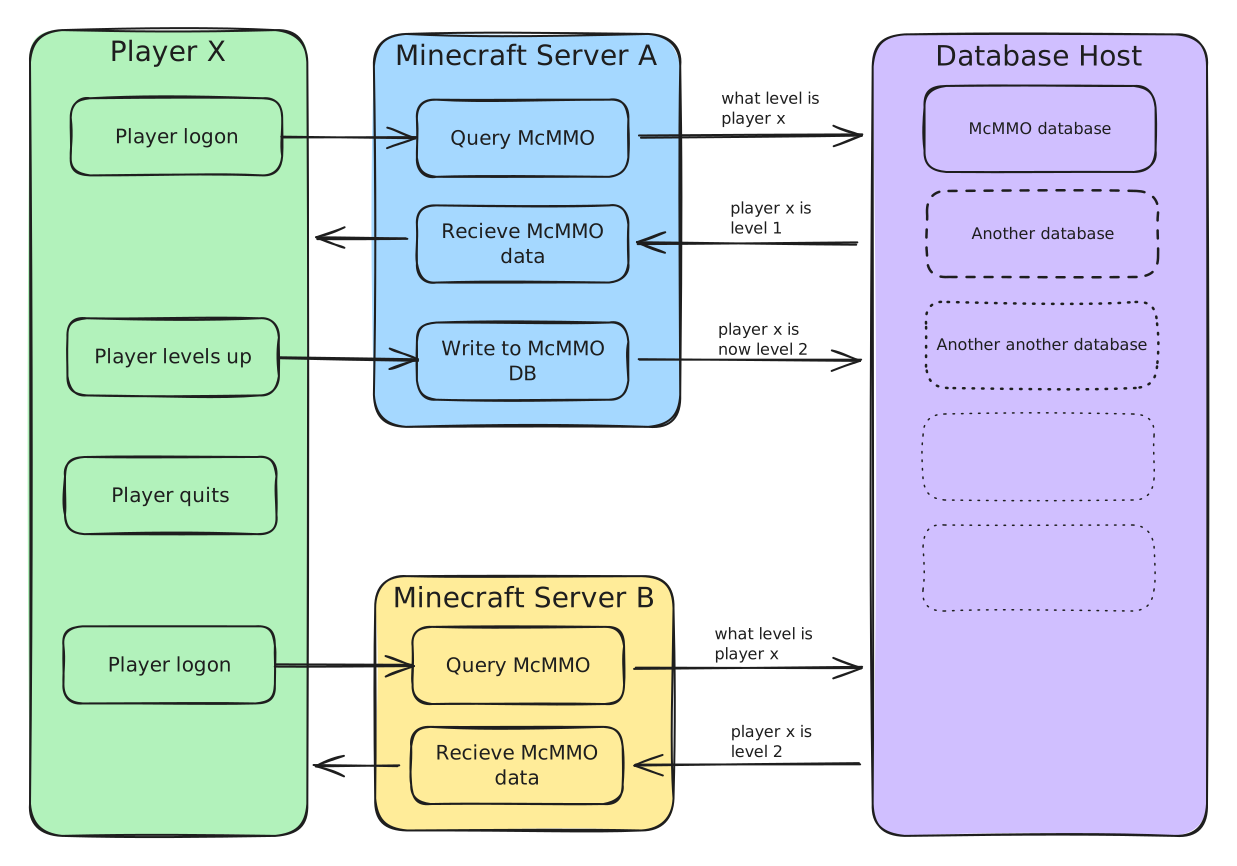
There are a few ways to do this, each with their own advantages and disadvantages
## Database solutions
There are a few ways to do this, each with their own advantages and disadvantages
| Difficulty to configure | Difficulty to manage | Impact of cyber breach | Impact of database corruption | |
|---|---|---|---|---|
| Shared Database | 2 | 1 | 3 | 3 |
| Per Node | 4 | 3 | 1 | 1 |
| Panel Database | 2 | 1 | 5 | 5 |
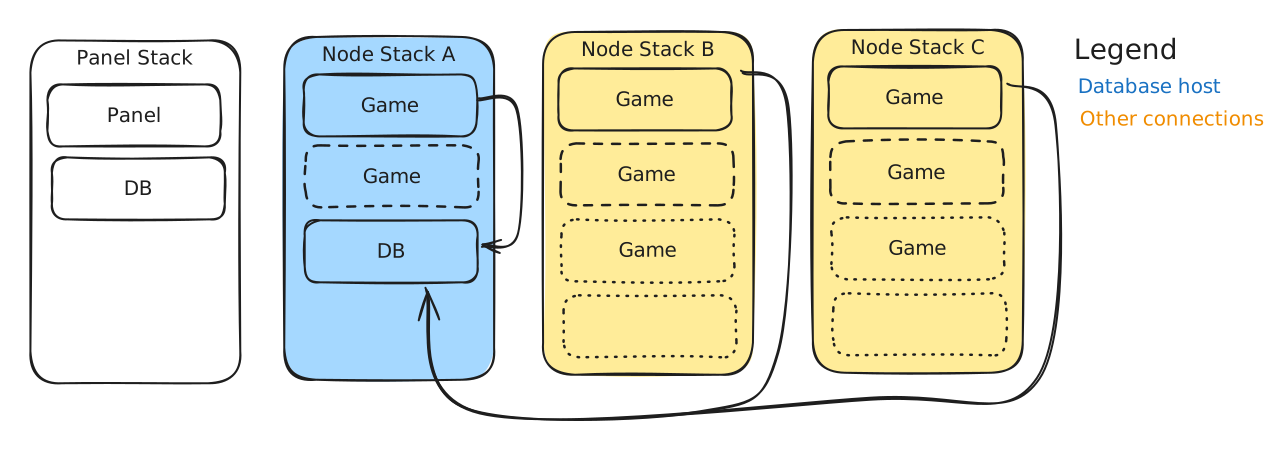 The database is hosted on a dedicated node, and the other nodes connect to this one. The other nodes need to be able to communicate with the host.
**If you migrate a server from node A to B everything will continue to function.**
**If your database corrupts you may lose all data for all nodes.**
If one of your game servers is breached and the bad actor got your database credentials they may be able to alter the other server DBs. This is unlikely though, as Pelican creates a dedicated user per database.
### Database per node
The database is hosted on a dedicated node, and the other nodes connect to this one. The other nodes need to be able to communicate with the host.
**If you migrate a server from node A to B everything will continue to function.**
**If your database corrupts you may lose all data for all nodes.**
If one of your game servers is breached and the bad actor got your database credentials they may be able to alter the other server DBs. This is unlikely though, as Pelican creates a dedicated user per database.
### Database per node
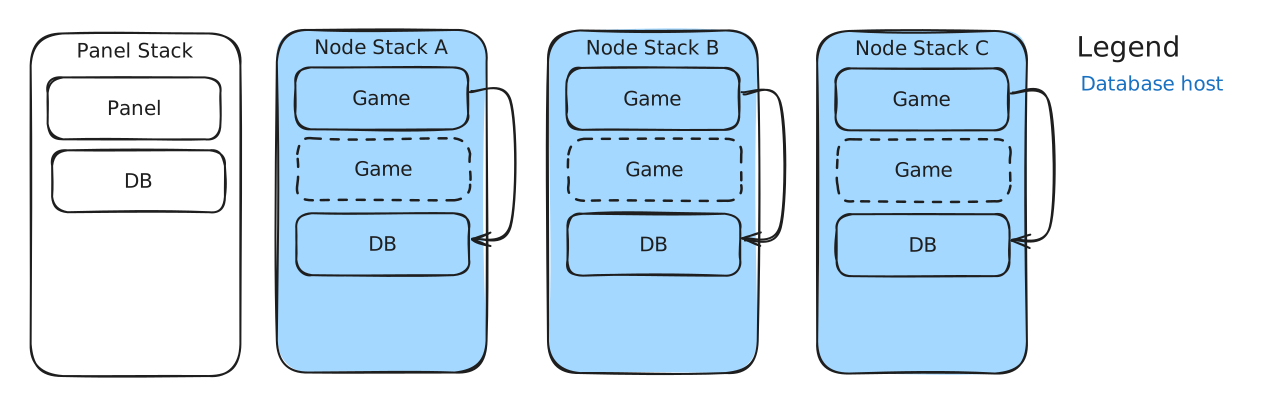 This is the most secure method, as each node has its own database - there is no communication outbound. **Migrating a game server from node A to B will break the database connection**
**If your database corrupts you may lose all data on a single node**
If one of your game servers is breached and the bad actor got your database credentials they may be able to alter DBs on the node. This is unlikely though, as Pelican creates a dedicated user per database. **The bad actor will not be able to touch databases on other nodes.**
### Use the Panel database
This is the most secure method, as each node has its own database - there is no communication outbound. **Migrating a game server from node A to B will break the database connection**
**If your database corrupts you may lose all data on a single node**
If one of your game servers is breached and the bad actor got your database credentials they may be able to alter DBs on the node. This is unlikely though, as Pelican creates a dedicated user per database. **The bad actor will not be able to touch databases on other nodes.**
### Use the Panel database
 ***This is the most dangerous option.***
If one of your game servers is breached and the bad actor gained database credentials, they may be able to alter your Pelican database. **This would allow them to create an administrator user and take over your Pelican install.**
**If your database corrupts you may lose all data for all nodes and the Panel data.** This would require a Pelican reinstall or restore from backup.
## Create your Database
This guide will step you through how to create a shared database from a Ptero / Pelican egg.
{% hint style="info" %}
This requires all nodes to be able to access the machine hosting the database. If your notes are not located all at the same site, you could use a VPN client or go down the per node route.
{% endhint %}
{% hint style="danger" %}
***Do not port forward your DB***
{% endhint %}
### Create your Database
If you haven't already, import the relevant database egg per [First server](/guides/installation-guides/pelican/first-server.md#import-eggs)
{% hint style="info" %}
**I am going to assume MariaDB for this guide - your commands may be different if using something else**
You may need to do some reading on your servers / mod / plugins database requirements to select the correct DB type
{% endhint %}
1. Create your database using one of your intenal ports
***This is the most dangerous option.***
If one of your game servers is breached and the bad actor gained database credentials, they may be able to alter your Pelican database. **This would allow them to create an administrator user and take over your Pelican install.**
**If your database corrupts you may lose all data for all nodes and the Panel data.** This would require a Pelican reinstall or restore from backup.
## Create your Database
This guide will step you through how to create a shared database from a Ptero / Pelican egg.
{% hint style="info" %}
This requires all nodes to be able to access the machine hosting the database. If your notes are not located all at the same site, you could use a VPN client or go down the per node route.
{% endhint %}
{% hint style="danger" %}
***Do not port forward your DB***
{% endhint %}
### Create your Database
If you haven't already, import the relevant database egg per [First server](/guides/installation-guides/pelican/first-server.md#import-eggs)
{% hint style="info" %}
**I am going to assume MariaDB for this guide - your commands may be different if using something else**
You may need to do some reading on your servers / mod / plugins database requirements to select the correct DB type
{% endhint %}
1. Create your database using one of your intenal ports
Do not use one of your play / join ports. Doing so will expose your DB to the internet, which increases the risk of the db being breached or taken offline.
| Host | DNS name or IP of the wings node running the database container |
| Port | The port selected during creation |
| Display name | Whatever you want - I would suggest the hostname / DNS name of the server |
| Linked nodes | Set this to any Wings nodes you want to talk to this DB. These nodes need to be able to reach the hostname / IP in the host field |