> For the complete documentation index, see [llms.txt](https://www.trentbauer.com/llms.txt). Markdown versions of documentation pages are available by appending `.md` to page URLs; this page is available as [Markdown](https://www.trentbauer.com/guides/installation-guides/crowdsec/ubuntu.md).
# Ubuntu
| |
|---|
| Total Time Required | 10 minutes |
| Difficulty | Easy |
| Required Knowledge | Crowdsec, Docker Compose |
 ## Prerequisites
* Crowdsec account
* [You have subscribed to atleast 1 block list](/guides/installation-guides/crowdsec.md#add-blocklists)
* [Your Crowdsec enrollment key](/guides/installation-guides/crowdsec.md#generate-your-enrol-key)
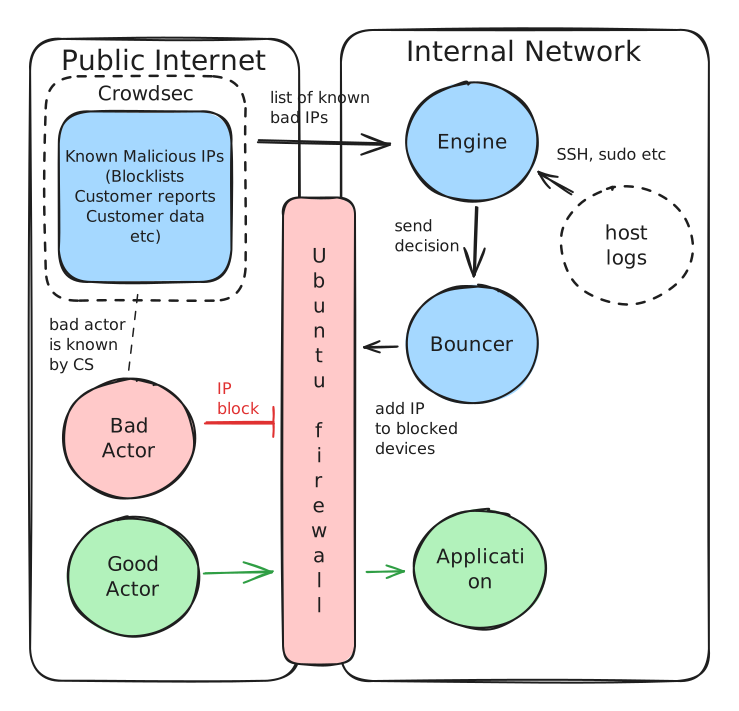
#### This stack monitors...
* SSH logs
* Sudo logs
* Crowdsec blocklists
* Crowdsec whitelists
#### ... And changes
* Host firewall
## Docker Compose
```dotenv
# --- CrowdSec Engine Settings ---
CROWDSEC_ENROLL_KEY=
BOUNCER_KEY=
CROWDSEC_NAME=
CROWDSEC_PORT=8080
```
{% @github-files/github-code-block url="" %}
## Prerequisites
* Crowdsec account
* [You have subscribed to atleast 1 block list](/guides/installation-guides/crowdsec.md#add-blocklists)
* [Your Crowdsec enrollment key](/guides/installation-guides/crowdsec.md#generate-your-enrol-key)
#### This stack monitors...
* SSH logs
* Sudo logs
* Crowdsec blocklists
* Crowdsec whitelists
#### ... And changes
* Host firewall
## Docker Compose
```dotenv
# --- CrowdSec Engine Settings ---
CROWDSEC_ENROLL_KEY=
BOUNCER_KEY=
CROWDSEC_NAME=
CROWDSEC_PORT=8080
```
{% @github-files/github-code-block url="" %}