# Cloudflare security rules

<table data-view="cards"><thead><tr><th></th><th></th></tr></thead><tbody><tr><td>Total Time Required</td><td>15 minutes</td></tr><tr><td>Difficulty</td><td>Easy</td></tr><tr><td>Required Knowledge</td><td>Crowdsec, Cloudflare</td></tr></tbody></table>

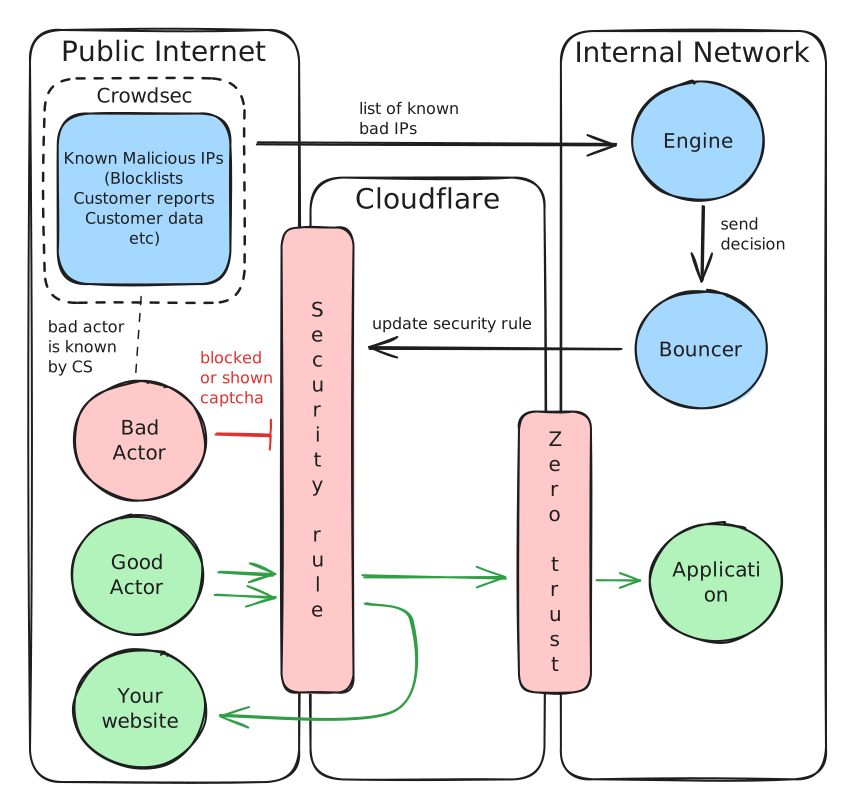
<img src="/files/xtg9NP02DwIKyaN1xEk0" alt="" class="gitbook-drawing">

## Prerequisites

* Crowdsec account
* [You have subscribed to atleast 1 block list](/guides/installation-guides/crowdsec.md#add-blocklists)
* [Your Crowdsec enrollment key](/guides/installation-guides/crowdsec.md#generate-your-enrol-key)

{% hint style="warning" %}
I recommend setting up a unique stack per domain you manage. This reduces the impact if the API key is leaked.
{% endhint %}

#### This stack monitors...

* Crowdsec blocklists

#### ... And changes

* Cloudflare security rules

## Cloudflare

Generate your API key, get your details and create your security rules

### Get your Account ID

1. Browse to <https://dash.cloudflare.com/>
2. Next to your name, click on the 3 dots and select Copy Account ID
3. Save to your notepad, `CF_ACCOUNTID=`

### Get your Zone ID

1. Browse to <https://dash.cloudflare.com/?to=/:account/home/domains>&#x20;
2. Click manage next to your domain
3. Scroll down and locate "API" on the right
4. Save  your Zone ID to your notepad, `CF_ZONE_ID=`

### Generate an API key

1. Navigate here <https://dash.cloudflare.com/profile/api-tokens>
2. Click on Create token > custom token
   1. Give your token a name and fill out the below permissions

      <table><thead><tr><th width="148"></th><th width="357"></th><th></th></tr></thead><tbody><tr><td>Account</td><td>Account Filter Lists</td><td>Edit</td></tr><tr><td>Account</td><td>Firewall Access Rules</td><td>Edit</td></tr><tr><td>Zone</td><td>Zone</td><td>Read</td></tr><tr><td>Zone</td><td>Firewall Services</td><td>Edit</td></tr></tbody></table>
   2. Account resources

      | Field   | Data         |
      | ------- | ------------ |
      | Include | All Accounts |
   3. Zone resources

      |         |               |             |
      | ------- | ------------- | ----------- |
      | Include | Specific Zone | Your Domain |
   4. Click on continue to summary
3. Save your API key to your notepad, `CF_APITOKEN=`

### Set your Security rules

Configure some security rules to reduce the risk of malicious actors accessing your domain

1. Navigate to <https://dash.cloudflare.com/>
2. Select your domain
3. On the left, click expand Security and select rules
4. Click on create rule > custom rule
   1. Next to Expression Preview, click on 'edit expression' to get the free text field
5. Create a rule for each of the below

### Block bots

This policy will show a Captcha challenge to any IPs suspected of botting

<table><thead><tr><th width="229">Field</th><th>Data</th></tr></thead><tbody><tr><td>Rule Name</td><td>Block Bots</td></tr><tr><td>Expression</td><td>(cf.client.bot)</td></tr><tr><td>Choose action</td><td>Managed Challenge</td></tr><tr><td>Place at</td><td>First</td></tr></tbody></table>

### Challenge Threat Score

These IPs are potentially malicious. These addresses will be prompted for Captcha

<table><thead><tr><th width="229">Field</th><th>Data</th></tr></thead><tbody><tr><td>Rule Name</td><td>Challenge Threat Score</td></tr><tr><td>Expression</td><td>(cf.threat_score gt 10)</td></tr><tr><td>Choose action</td><td>Managed Challenge</td></tr><tr><td>Place at</td><td>Custom - after 'Block Bots'</td></tr></tbody></table>

### Block Threat Score

These IPs are very likely to be malicious. These addresses will be blocked

<table><thead><tr><th width="229">Field</th><th>Data</th></tr></thead><tbody><tr><td>Rule Name</td><td>Challenge Threat Score</td></tr><tr><td>Expression</td><td>(cf.threat_score gt 50)</td></tr><tr><td>Choose action</td><td>Block</td></tr><tr><td>Place at</td><td>Custom - after 'Challenge Threat Score'</td></tr></tbody></table>

{% hint style="info" %}
An additional rule will be created by the Crowdsec CF Bouncer container after the Compose file is ran
{% endhint %}

## Docker Compose

Fill out the below env using your notes

```dotenv
# --- CrowdSec Engine Settings ---
CROWDSEC_ENROLL_KEY=

# --- Cloudflare Credentials ---
CF_APITOKEN=
CF_ACCOUNTID=
CF_ZONE_ID=
```

{% @github-files/github-code-block url="<https://github.com/trentnbauer/HomelabPublic/blob/main/docker-compose/crowdsec-cloudflare.yml>" %}


---

# Agent Instructions: Querying This Documentation

If you need additional information that is not directly available in this page, you can query the documentation dynamically by asking a question.

Perform an HTTP GET request on the current page URL with the `ask` query parameter:

```
GET https://www.trentbauer.com/guides/installation-guides/crowdsec/cloudflare-security-rules.md?ask=<question>
```

The question should be specific, self-contained, and written in natural language.
The response will contain a direct answer to the question and relevant excerpts and sources from the documentation.

Use this mechanism when the answer is not explicitly present in the current page, you need clarification or additional context, or you want to retrieve related documentation sections.